![5f31aff63dbd5c7276c1adbb_logo (1).svg]](https://support.genustechnologies.com/hubfs/Genus%20Logos/5f31aff63dbd5c7276c1adbb_logo%20(1).svg)
If you encounter an error such as "[A] {SomeClassName} cannot be cast to [B] {SomeClassName]", such as "[A]Kofax.SAL.Inf.ServerData cannot be cast to [B]Kofax.SAL.Inf.ServerData", it may be caused by different versions of the same DLL file both being loaded into the runtime.
To alleviate, try to determine the correct version by looking at another system or checking which version of the .dll was packaged in the installer.
You will need to unregister the wrong version in the Global Assembly Cache (GAC) and register the correct one. To do this:
1. Check what version of the .dll is registred in the GAC
gacutil -l NameOfDll (without the file extension)
2. Remove the incorrect version, or all versions
gacutil -u NameOfDll (without the file extension)
3. Register the correct version
gacutil -i FullPathToCorrectDll (with the file extension)
For example, this error was encountered while launching Transformation Designer:
Kofax.SAL.Client.SALicClientException, KSALicClnt, Version=6.3.0.0, Culture=neutral, PublicKeyToken=2a06c44ecf114f0f
Message : [7001] SALicClnt: [A]Kofax.SAL.Inf.ServerData cannot be cast to [B]Kofax.SAL.Inf.ServerData. Type A originates from 'KSALicSrvInf, Version=6.5.0.0, Culture=neutral, PublicKeyToken=2a06c44ecf114f0f' in the context 'Default' at location 'C:\Windows\Microsoft.Net\assembly\GAC_MSIL\KSALicSrvInf\v4.0_6.5.0.0__2a06c44ecf114f0f\KSALicSrvInf.dll'. Type B originates from 'KSALicSrvInf, Version=6.3.0.0, Culture=neutral, PublicKeyToken=2a06c44ecf114f0f' in the context 'Default' at location 'C:\Windows\Microsoft.NET\Framework64\v4.0.30319\Temporary ASP.NET Files\totalagility\3b87e2d8\3a824e0e\assembly\dl3\63e81857\00b50e28_8682d701\KSALicSrvInf.dll'.
Source : KSALicClnt
Help link :
Error : 7001
ModuleID : SALicClnt
MessageUnformatted : [A]Kofax.SAL.Inf.ServerData cannot be cast to [B]Kofax.SAL.Inf.ServerData. Type A originates from 'KSALicSrvInf, Version=6.5.0.0, Culture=neutral, PublicKeyToken=2a06c44ecf114f0f' in the context 'Default' at location 'C:\Windows\Microsoft.Net\assembly\GAC_MSIL\KSALicSrvInf\v4.0_6.5.0.0__2a06c44ecf114f0f\KSALicSrvInf.dll'. Type B originates from 'KSALicSrvInf, Version=6.3.0.0, Culture=neutral, PublicKeyToken=2a06c44ecf114f0f' in the context 'Default' at location 'C:\Windows\Microsoft.NET\Framework64\v4.0.30319\Temporary ASP.NET Files\totalagility\3b87e2d8\3a824e0e\assembly\dl3\63e81857\00b50e28_8682d701\KSALicSrvInf.dll'.
MessageWithNumber : [7001] [7001] SALicClnt: [A]Kofax.SAL.Inf.ServerData cannot be cast to [B]Kofax.SAL.Inf.ServerData. Type A originates from 'KSALicSrvInf, Version=6.5.0.0, Culture=neutral, PublicKeyToken=2a06c44ecf114f0f' in the context 'Default' at location 'C:\Windows\Microsoft.Net\assembly\GAC_MSIL\KSALicSrvInf\v4.0_6.5.0.0__2a06c44ecf114f0f\KSALicSrvInf.dll'. Type B originates from 'KSALicSrvInf, Version=6.3.0.0, Culture=neutral, PublicKeyToken=2a06c44ecf114f0f' in the context 'Default' at location 'C:\Windows\Microsoft.NET\Framework64\v4.0.30319\Temporary ASP.NET Files\totalagility\3b87e2d8\3a824e0e\assembly\dl3\63e81857\00b50e28_8682d701\KSALicSrvInf.dll'.
Observe:
Type A originates from 'KSALicSrvInf, Version=6.5.0.0 ... at location 'C:\Windows\Microsoft.Net\assembly\GAC_MSIL\KSALicSrvInf\v4.0_6.5.0.0__2a06c44ecf114f0f\KSALicSrvInf.dll'
Type B originates from 'KSALicSrvInf, Version=6.3.0.0... at location 'C:\Windows\Microsoft.NET\Framework64\v4.0.30319\Temporary ASP.NET Files\totalagility\3b87e2d8\3a824e0e\assembly\dl3\63e81857\00b50e28_8682d701\KSALicSrvInf.dll'.
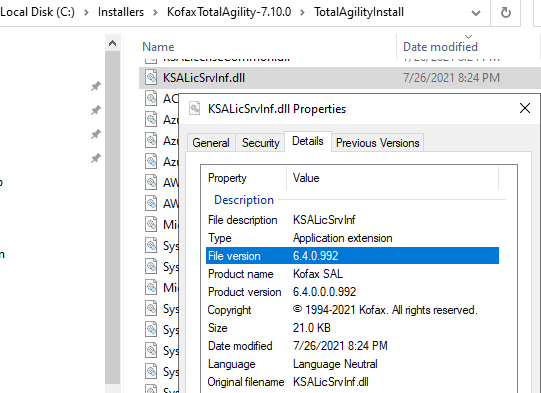
Looking at the KSALicSrvInf.dll from the installer, and also in the TotalAgility Installation directory, we see all the versions are 6.4.0.992, telling us this is the correct version.
And that this is likely the incorrect version
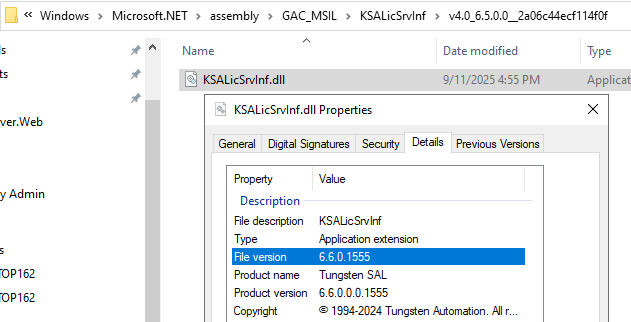
We see that the 6.5/6.6 version is registered

So unregister it


And register the one from the installer:
